


version 1.0.9 - Download ZIP file
version 1.0.8 - Download ZIP file
Grid View for Google Meet™
This extension helps to adds a button to use a grid layout in Google Meet.
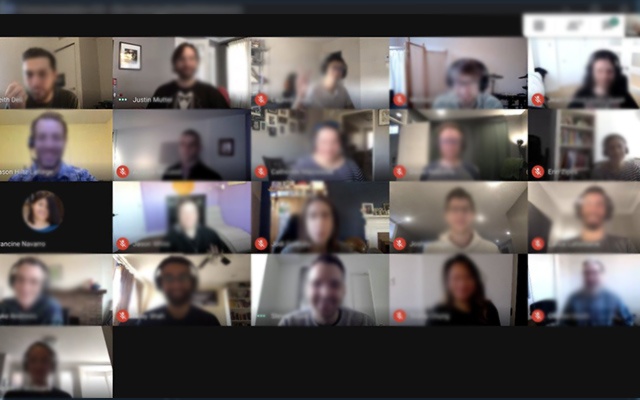
This extension adds a button to the top right bar (next to chat & participant list) to enable grid-view in Google Meet. Grid view gives every participant an equal sized video for use in meetings without a primary speaker
(such as working from home silent meetings ). Try Grid View for hangouts meet.
This extension forcibly loads every participant's video camera, when grid view is enabled and may cause performance issues in extremely large meetings . This software is helpful for Google Meet Grid View, it helps teachers who need to ensure students are paying attention during online classes. It also works for google hangouts meet
Change Log 1.0.2
- Fixed a bug when grid view did not work well if there were more then 12 participants inside a Google Meet meeting.
Change Log 1.0.5
- Fixed the bug for grid view not working correctly.
Change Log 1.0.7
- Added in "Push to Talk" functionality as well. By default, this functionality is switched off. Useful to prevent meeting blunders as you need to press the "space bar" to begin talking. Removes the risk of having "live microphone".
Includes a variety of options to enhance your meeting: include your own video, highlight who is speaking, and hide participants without video!
Change Log 1.0.8
Updated so it works with new design of Google Meet.
To begin using this extension for Google Meet or google meet app, here is what you need to do
Install the Software Extension
Go inside a Google Meet meeting.
Click on the extension icon when you are IN the meeting to activate our extension.
Please NOTE you HAVE to be inside the Google Meeting before you click on the extension icon for this grid view to be enabled.
Grid View will be enabled once you click on the extension icon when you are in a Google Meet online video call.
Please note if you have a large number of participants inside your Google Meet call, it may cause the meeting connection to be unstable if your internet connection is slow/you are using a older computer.
Leave us some feedback if you have any questions/issues for Grid View for google video conference
Disclaimer: Please note this extension is NOT made by Google and is made by an independent development team. All copyrights belong to their respective owners.
Google doesn’t endorse or sponsor this Chrome extension. This is not owned by, it is not licensed by and is not a subsidiary of Google Inc.
Extore is a team of professionals who are passionate about creating extensions for web browsers. This devotion also gives us opportunity to appreciate work of other people. We get inspired by useful, open source extensions made by developers all over the world. Our strong belief is that one should share helpful add-ons with others. That’s why we’d like to present you our ever-growing list of favourite extensions that have inspired us. Moreover, as you probably have already learned, sometimes struggling for the best brings an end to the good. Talking about add-ons it often turns out that an upgrade is worse then previous version. Also it can become really tricky to get back to the beloved version of your favourite extension. That’s why we’re going to make not only the latest, but all versions of our favourite (and we hope yours too) add-ons available for download. No more compromises, just stick to the version you really like!
 Preparing download link, please wait for seconds
Almost done...
Click to download
Error getting file. Please try again
Preparing download link, please wait for seconds
Almost done...
Click to download
Error getting file. Please try again







