

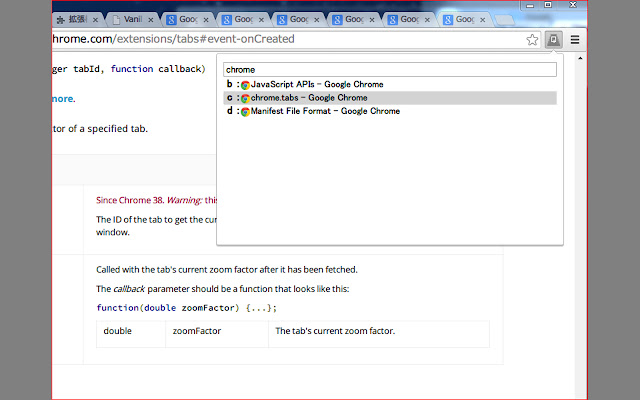
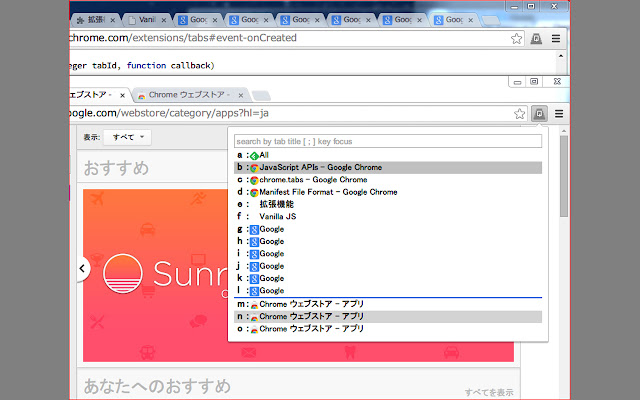
ショートカットキーを利用してタブを素早く切り替えることができます。
[ショートカットキー]
"a-z,A-Z" -> 該当のタブに切り替え
";" -> 検索ボックスにフォーカス
","(コンマ)"."(ドット) -> タブリストを上下にスクロール
[詳細]
アドオン起動で表示されるタブリストの左側に表示されるアルファベットを入力することで目的のタブに切り替えることができます。
(タブリストの該当タブ行をクリックすることでも切り替えることができます。
[;]キーで、検索ボックスを入力することができます。
検索ボックスではタブリストをタイトルで絞り込むことができます。
タブの数が多く、スクロールバーが表示されている場合は
[,(コンマ) .(ドット)]キーで上下にスクロールすることができます。
表示するタブリストは最大52のタブに対応しています。
// 更新履歴
0.0.2 動作の改善 拡張機能ページのアイコン設定
0.0.3 動作の改善 タブの一覧をキャッシュ
動作の改善 未使用時のメモリ使用量を削減
機能追加 現在のタブ数を表示
Extore is a team of professionals who are passionate about creating extensions for web browsers. This devotion also gives us opportunity to appreciate work of other people. We get inspired by useful, open source extensions made by developers all over the world. Our strong belief is that one should share helpful add-ons with others. That’s why we’d like to present you our ever-growing list of favourite extensions that have inspired us. Moreover, as you probably have already learned, sometimes struggling for the best brings an end to the good. Talking about add-ons it often turns out that an upgrade is worse then previous version. Also it can become really tricky to get back to the beloved version of your favourite extension. That’s why we’re going to make not only the latest, but all versions of our favourite (and we hope yours too) add-ons available for download. No more compromises, just stick to the version you really like!
 Preparing download link, please wait for seconds
Almost done...
Click to download
Error getting file. Please try again
Preparing download link, please wait for seconds
Almost done...
Click to download
Error getting file. Please try again







