
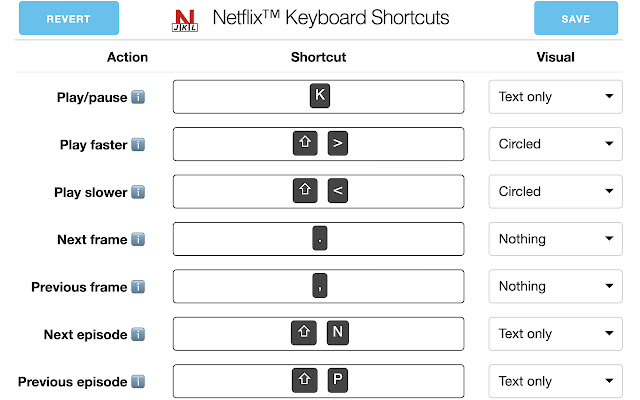


An extension for Netflix that adds 30+ configurable keyboard shortcuts to control playback and more with your keyboard alone. No need to reach for the mouse to turn on subtitles or go to the next episode. Make the shortcuts your own! Each action is configurable.
Each shortcut is easily configurable with a click on the extension's icon at the right of the address bar. Make sure to "pin" the extension icon for easy access!
Currently available:
- Play or pause a video: K
- Go back 10 seconds: J
- Skip forward 10 seconds: L
- Go back 60 seconds: Shift-J
- Skip forward 60 seconds: Shift-L
- Go back by 1 frame: , (comma)
- Go forward by 1 frame: . (dot)
- Toggle subtitles: C
- Change subtitles language: V
- Change subtitles size: S
- Change audio track: A
- Play next episode: Shift-N
- Play previous episode: Shift-P
- Back up (save) current position: B
- Restore saved position: R
- Provide thumbs up rating: + (plus)
- Provide thumbs down rating: - (minus)
- Jump to 0%, 10%… up to 90% of the video: press 0, 1… up to 9
- Set custom shortcuts for volume up/down
- Configure the amount of volume change for your volume shortcuts
- Some variants of the above and more are also available.
A visual indicator can be configured for each action: there can be a very brief flashing symbol on the screen (with different styles), or just no indicator at all if you prefer it that way.
You can also create your own new shortcuts and assign them a custom number of seconds to jump by, forward or backward. For example, you can create a +10 minutes shortcut by setting the "seconds" value to 600 and choosing your own key combination.
Other options also built-in:
- Automatically skip series intro credits (can be turned on or off)
- Automatically select your preferred language for subtitles
- Automatically select your preferred subtitles size
Suggestions and feedback are welcome! Please send them by email to [email protected]
Important:
"Netflix™" is a trademark of Netflix, Inc.
This extension is NOT built or sponsored or endorsed in any way by Netflix, Inc.
Disclaimer:
The software is provided “as is”, without warranty of any kind, express or implied, including but not limited to the warranties of merchantability, fitness for a particular purpose and non-infringement. In no event shall the authors or copyright holders be liable for any claim, damages or other liability, whether in an action of contract, tort or otherwise, arising from, out of or in connection with the software or the use or other dealings in the software.
Extore is a team of professionals who are passionate about creating extensions for web browsers. This devotion also gives us opportunity to appreciate work of other people. We get inspired by useful, open source extensions made by developers all over the world. Our strong belief is that one should share helpful add-ons with others. That’s why we’d like to present you our ever-growing list of favourite extensions that have inspired us. Moreover, as you probably have already learned, sometimes struggling for the best brings an end to the good. Talking about add-ons it often turns out that an upgrade is worse then previous version. Also it can become really tricky to get back to the beloved version of your favourite extension. That’s why we’re going to make not only the latest, but all versions of our favourite (and we hope yours too) add-ons available for download. No more compromises, just stick to the version you really like!
 Preparing download link, please wait for seconds
Almost done...
Click to download
Error getting file. Please try again
Preparing download link, please wait for seconds
Almost done...
Click to download
Error getting file. Please try again







