


version 1.2.9 - Download ZIP file
version 1.2.8 - Download ZIP file
version 1.2.5 - Download ZIP file
version 1.2.4 - Download ZIP file
version 1.2.2 - Download ZIP file
version 1.2.1 - Download ZIP file
version 1.2.0 - Download ZIP file
version 1.1.20 - Download ZIP file
version 1.1.19 - Download ZIP file
Turn on real-time trackers
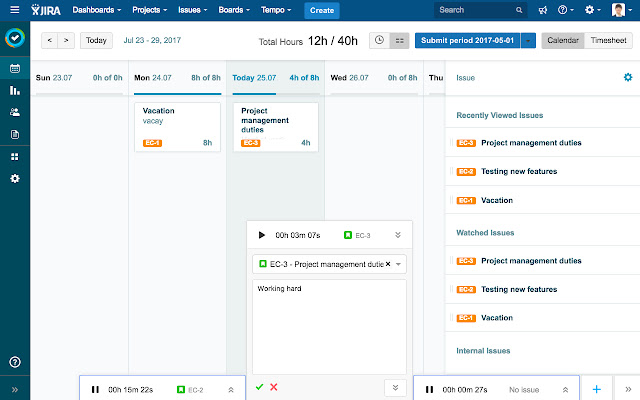
• Simply open a tracker and attach it to a JIRA issue, or use the timer alone. Start, stop, and pause as you see fit.
• Open multiple trackers
• Use as many trackers as you like. Simply open a new tracker when you start work on a new issue.
• Visualize your work at all times
• See what you are working on at any time from the bottom-right of your Chrome browser. Navigate between views and log work on open issues without spending time searching for them.
✸Tempo for Chrome is free and available for all Tempo Cloud for JIRA customers
We are constantly updating our Tempo for Chrome app to make it even better. We've listened to your feedback and here's what's new.
Changelog:
v.1.2.9
• Fix - Tracker does not disappear after logging time.
v.1.2.7
• Fix - Styling fix for custom issue icons.
v.1.2.6
• Fix - When running many trackers, extension was sending too many requests to the server.
v.1.1.4
• Update - Improved authentication process.
• Update - Permission limitations.
v.1.1.0
• New - When viewing an issue, any tracker started from that view will automatically be attached to that issue.
• New - When viewing a board with an issue selected, any tracker started will automatically be attached to that issue.
• New - When deleting your Tempo for Chrome connection, you are now asked to confirm that you'd like to delete.
• New - When deleting trackers, you are now asked to confirm that you'd like to delete.
• New - Now you can scroll to see hidden trackers when many are running at the same time.
• New - You can now start a tracker from the Tempo dropdown menu.
• Fix - Support for the new issue view.
• Fix - Timezone issues.
• Fix - The issue picker now searches all issues.
• Fix - Problems editing the worklog description.
• Fix - Unexpected scrollbar no longer present in Tempo for Chrome user interface
• Fix - Tempo for Chrome user interface no longer blocks JIRA elements in some cases.
Learn more: https://tempo.io/tempo-for-chrome
Extore is a team of professionals who are passionate about creating extensions for web browsers. This devotion also gives us opportunity to appreciate work of other people. We get inspired by useful, open source extensions made by developers all over the world. Our strong belief is that one should share helpful add-ons with others. That’s why we’d like to present you our ever-growing list of favourite extensions that have inspired us. Moreover, as you probably have already learned, sometimes struggling for the best brings an end to the good. Talking about add-ons it often turns out that an upgrade is worse then previous version. Also it can become really tricky to get back to the beloved version of your favourite extension. That’s why we’re going to make not only the latest, but all versions of our favourite (and we hope yours too) add-ons available for download. No more compromises, just stick to the version you really like!
 Preparing download link, please wait for seconds
Almost done...
Click to download
Error getting file. Please try again
Preparing download link, please wait for seconds
Almost done...
Click to download
Error getting file. Please try again







