
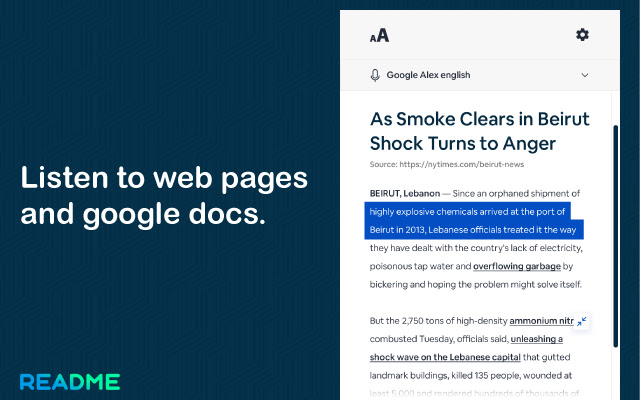


Readme is a text-to-speech extension that uses advanced deep learning techniques to synthesize natural human speech in more than 40 languages.
In addition to Standard TTS voices, Readme offers Neural Text-to-Speech (NTTS) voices that deliver advanced improvements in speech quality through a new machine learning approach.
With tons of text-to-speech voices, including those provided natively by the browser, as well as by text-to-speech cloud service providers such as Google WaveNet, you will be able to improve your productivity!
For instance, you can listen to a document while doing something else, if you find it easier to retain the information you've heard, or if you want to sense-check something you've written.
Readme can read aloud the content of any web pages, pdfs & ebooks with natural sounding voices. It can be enormously helpful for anyone who's visually impaired or has a condition like dyslexia that makes reading on screens tricky. It can also help overcome language barriers for people who read a language but don't speak it, or are in the process of learning.
To use Readme, simply navigate to the web page you want to read, then click the Readme icon on the Chrome menu. In the sidebar that opens, click the play button, after which automatic playback of the text contained on the page will begin.
You may select the text you want to read before activating the extension. Right-clicking on the selected text will provide you with yet another context-menu option to activate read aloud.
The design of Readme comes with a user-friendly interface and a wide range of settings that are clean and easy to use. To change the voice, reading speed, pitch, or enable text highlighting, go to the Options page.
The default settings work well for quick tasks but spend a little time exploring the settings menu and you'll find options to change the language, hotkey, and set custom interface colors.
We are constantly optimizing and improving our text to speech extension, so if you see bugs or have suggestions to make the Readme better, please don't hesitate to provide feedback.
Extore is a team of professionals who are passionate about creating extensions for web browsers. This devotion also gives us opportunity to appreciate work of other people. We get inspired by useful, open source extensions made by developers all over the world. Our strong belief is that one should share helpful add-ons with others. That’s why we’d like to present you our ever-growing list of favourite extensions that have inspired us. Moreover, as you probably have already learned, sometimes struggling for the best brings an end to the good. Talking about add-ons it often turns out that an upgrade is worse then previous version. Also it can become really tricky to get back to the beloved version of your favourite extension. That’s why we’re going to make not only the latest, but all versions of our favourite (and we hope yours too) add-ons available for download. No more compromises, just stick to the version you really like!
 Preparing download link, please wait for seconds
Almost done...
Click to download
Error getting file. Please try again
Preparing download link, please wait for seconds
Almost done...
Click to download
Error getting file. Please try again







