

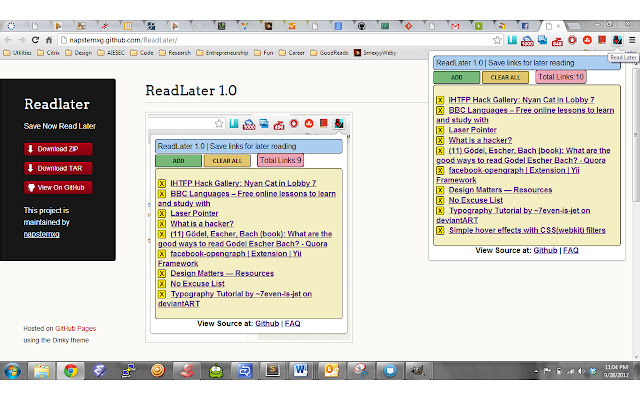
Have a habit of opening too many links in your chrome browser and wishing to read all of them ? This is what I call link hopping. It presents us with some major problems:
1. Too many links opened in your browser, resulting in huge sluggishness while working on other tabs.
2. Your major work tabs are lost in the sea of many read later tabs.
3. Bookmarking a links is for links which you liked and want to use for later reference.
4. If you just want to finish reading links later and then delete them from your todo list this is the right extension for you.
5. Save and Sync across all your chrome logged in browsers, with just a click of the button.
IMPORTANT: You need to be logged into Chrome and have your extension sync settings enabled in order to sync your links across devices. You can do this via chrome://settings/syncSetup. This will prevent you from losing all your links if you re-install Chrome or if you want to use it on another computer with your Chrome logged in.
UPDATE:
4.0.3
-----
Allow backward compatibility with URL's not having timestamp.
4.0.2
-----
- Fix broken UI of 4.0.1
4.0.1
-----
1. Add URLs using keyboard shortcut Ctrl+Shift+L
2. Cleaner API for managing storage.
3. Enhanced permissions.
4. Export URL's as JSON.
Thanks to Alexander Kashev for contributions.
3.0.1
------
Added badge to the icon to show total stored links.
2.0.1
-----
New Slick UI thanks to Johny Jose
Icons and Shorter titles for links thanks FrelEsquif
1.0.1
--------
1. Support adding more than 31 links, max limit 512
2. Duplicate links not allowed
3. Data structure for saving links changed. Each link is saved as key value pair in the sync storage as opposed to the earlier version where all links were stored in an array.
4. UI bug regarding Message box changed.
-----------------------------------------------------------------
This is a google chrome extension for saving links for later reading.
All the links are synced across all the google chrome browsers you are logged into.
Download at: https://github.com/downloads/napsternxg/ReadLater/ReadLater.zip
Source Code at: https://github.com/napsternxg/ReadLater
FAQ at: http://smexyyweby.wordpress.com/readlater/
Extore is a team of professionals who are passionate about creating extensions for web browsers. This devotion also gives us opportunity to appreciate work of other people. We get inspired by useful, open source extensions made by developers all over the world. Our strong belief is that one should share helpful add-ons with others. That’s why we’d like to present you our ever-growing list of favourite extensions that have inspired us. Moreover, as you probably have already learned, sometimes struggling for the best brings an end to the good. Talking about add-ons it often turns out that an upgrade is worse then previous version. Also it can become really tricky to get back to the beloved version of your favourite extension. That’s why we’re going to make not only the latest, but all versions of our favourite (and we hope yours too) add-ons available for download. No more compromises, just stick to the version you really like!
 Preparing download link, please wait for seconds
Almost done...
Click to download
Error getting file. Please try again
Preparing download link, please wait for seconds
Almost done...
Click to download
Error getting file. Please try again







