


version 1.5.0 - Download ZIP file
version 1.4.0 - Download ZIP file
version 1.3.0 - Download ZIP file
version 1.1.0 - Download ZIP file
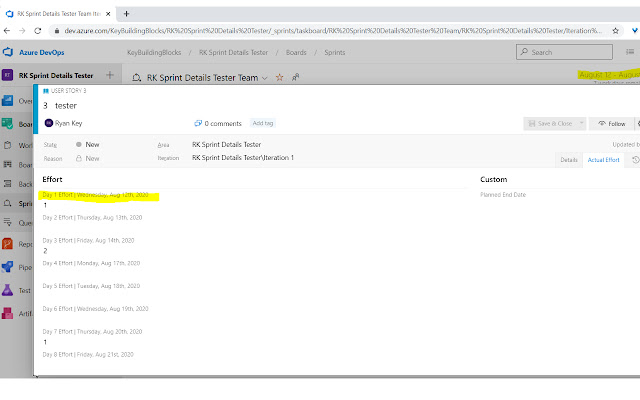
A simple extension used to convert custom field labels with integer placeholder. the Sprint Details field labels to dates based on the sprint's start date in Azure DevOps Sprint Boards.
Note this extension:
- Excludes weekends (Saturdays and Sundays).
- works with custom fields added to PBI, User Stories, Tasks and/or Bugs which are in a VSO TFS or DevOps Sprint Board.
- Requires manual creation of Custom Fields to collect data for each day of the Sprint.
- the Custom Field names MUST START WITH the case-insensitive word "Day"; all labels to add dates to must start with this. Everything after Day is optional, although we recommend using integers to easily keep track.
- the Custom Fields names CANNOT contain the pipe (|) character or dates will not be added.
- i.e. If you have a 5 business day sprint, you will create exactly 5 custom field labels (i.e. "Day 1 Data Collect"..."Day 5 Data collect"). If you have 10 business day sprints, you will have exactly 10 custom field labels.
- the Custom Fields should live together in a single tab of the DevOps card.
Getting Started:
1. Create Sprint in Azure DevOps with accurate start and end dates for each sprint.
2. Add the necessary fields to your User Stories.
Fields where dates of the sprint
3. Your Team starts using the Sprint Details Aide Extension to see readable dates.
See detailed instructions be found at the Support URL, including a video walk through. https://tinyurl.com/yxuk6agu
Daily User Instructions (after extension installation):
1. Open the current Sprint.
- NOTE: The dates will only be added when a story is opened on top of a Sprint Board (past, current or future).
2. Open the User Story/PBI/Task/Bug you worked on where you need to enter data for reporting.
3. Click the tab where the custom fields for each Day are listed.
4. Click the Sprint Details Aide Chrome Extension icon.
5. Observe the readable Date of the Sprint
Extore is a team of professionals who are passionate about creating extensions for web browsers. This devotion also gives us opportunity to appreciate work of other people. We get inspired by useful, open source extensions made by developers all over the world. Our strong belief is that one should share helpful add-ons with others. That’s why we’d like to present you our ever-growing list of favourite extensions that have inspired us. Moreover, as you probably have already learned, sometimes struggling for the best brings an end to the good. Talking about add-ons it often turns out that an upgrade is worse then previous version. Also it can become really tricky to get back to the beloved version of your favourite extension. That’s why we’re going to make not only the latest, but all versions of our favourite (and we hope yours too) add-ons available for download. No more compromises, just stick to the version you really like!
 Preparing download link, please wait for seconds
Almost done...
Click to download
Error getting file. Please try again
Preparing download link, please wait for seconds
Almost done...
Click to download
Error getting file. Please try again







