


version 2016.1.20 - Download ZIP file
version 2015.9.8 - Download ZIP file
version 2015.8.6 - Download ZIP file
version 2015.8.4 - Download ZIP file
version 2015.8.14 - Download ZIP file
version 2015.7.16 - Download ZIP file
version 2015.5.1.1 - Download ZIP file
version 2015.4.8.1 - Download ZIP file
version 2015.4.29.1 - Download ZIP file
version 2015.4.28.2 - Download ZIP file
version 2015.4.15.1 - Download ZIP file
version 0.0.20 - Download ZIP file
version 0.0.17 - Download ZIP file
NOTE: Google regularly pushes updates that break this extension => to fix this, I have to go through all the identifiers and update them and push an update - go to the Options page, temporarily untick the options, and re-tick them after a day or two.
This extension will:
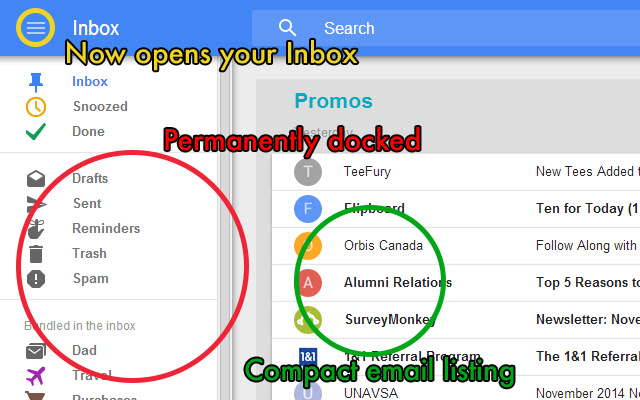
- create a "Compact" display density so that you are able to view more messages in a glance
- permanently dock the left-hand navigation menu on screens that are at least 1280 pixels in width
- make it so the "drawer" icon in the top-left corner will by default open your Inbox
- hide message reminders
- highlight bundles in yellow to distinguish them against individual emails
- make the compose window larger
- allow you to control which of the above tweaks you want to apply by clicking on the Google Inbox icon with the yellow + sign
Enjoy!
Changelog:
v2016.4.28: for the new "Saved" section, force the "Open Link" link to show even if the "Hide Message Preview" option is enabled
v2016.3.3.1: Google Inbox seems to have integrated quite a few of the tweaks from this extension! (e.g. persistent dock, a more compact inbox list). Updated to make it even more compact, plus minor fixes.
v2016.1.20: hide "View Issue (in Github)" under "Updates" if "Hide Message Preview" is enabled
v2015.9.8: fixed "drawer" icon display, added "Larger Compose Window" option, fixed compact message options display
v2015.8.14: fixed "drawer" icon behaviour in the top-left corner (Google changed element identifier)
v2015.8.6: added "Highlight Bundles" feature (default: disabled)
v2015.8.4: tweaked Settings layout
v2015.7.16: added "Hide Reminders" option, tweaked email message positioning, fixed partially changed identifiers, now properly aligns subject/message dash separator
v2015.5.1.1: updated yet again to match the changed element identifiers
v2015.4.29.1: updated yet again to match the changed element identifiers
v2015.4.28.2: fixed minor scrolling issue with dock icon
v2015.4.28.1: updated yet again to match the changed element identifiers
v2015.4.15.1: updated yet again to match the changed element identifiers
v2015.4.8.1: updated yet again to match the changed element identifiers, changed versioning semantics to incorporate update date (YYYY.MM.DD.Revision)
v0.0.20: created workaround for Drawer icon inbox jump functionality
v0.0.18/19: updated yet again to match the changed element identifiers (Drawer icon inbox jump functionality broken - currently working on resolving)
v0.0.17: updated yet again to match the changed element identifiers
v0.0.16: updated yet again to match the changed element identifiers
v0.0.15: updated yet again to match the changed element identifiers
v0.0.14: updated yet again to match the changed element identifiers (in the Settings dialog)
v0.0.13: updated yet again to match the changed element identifiers
v0.0.12: updated yet again to match the changed element identifiers
v0.0.11: updated yet again to match the changed element identifiers
v0.0.10: updated to match the changed element identifiers
v0.0.9: fixed green checkmark positioning in "Done" section
v0.0.8: compacted the the message options list and individual message display
v0.0.7: made "Compact" tweak yet more compact (beautiful navigation menu compactness).
v0.0.6: made "Compact" tweak more... compact.
v0.0.4 - 0.0.5: added an Options page to allow users to control what tweaks they'd like to apply to Google Inbox (click on the Google Invite icon with the yellow plus sign)
v0.0.3: tweaked fluid width for screens that are at least 1280 pixels in width (re: navigation menu docking)
v0.0.2: added width constraint on navigation menu docking (to accommodate smaller screens)
v0.0.1: initial release
Extore is a team of professionals who are passionate about creating extensions for web browsers. This devotion also gives us opportunity to appreciate work of other people. We get inspired by useful, open source extensions made by developers all over the world. Our strong belief is that one should share helpful add-ons with others. That’s why we’d like to present you our ever-growing list of favourite extensions that have inspired us. Moreover, as you probably have already learned, sometimes struggling for the best brings an end to the good. Talking about add-ons it often turns out that an upgrade is worse then previous version. Also it can become really tricky to get back to the beloved version of your favourite extension. That’s why we’re going to make not only the latest, but all versions of our favourite (and we hope yours too) add-ons available for download. No more compromises, just stick to the version you really like!
 Preparing download link, please wait for seconds
Almost done...
Click to download
Error getting file. Please try again
Preparing download link, please wait for seconds
Almost done...
Click to download
Error getting file. Please try again







