



ChatGPT to Notion brings the cleverness of ChatGPT into your favorite app!
???? USAGE ????
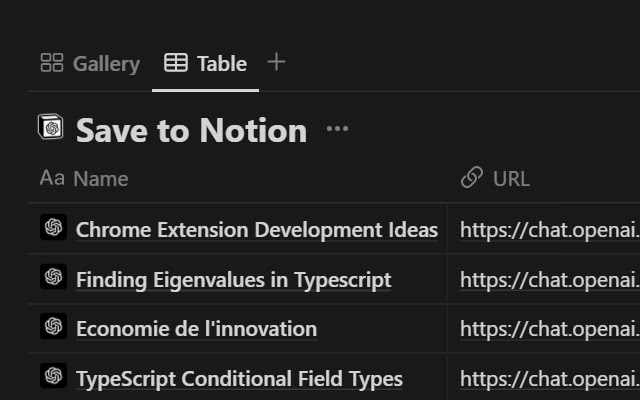
On ChatGPT's page, you'll notice a new pin icon under each of its answers. You can use it to save specifically that answer and the related prompt to your Notion database of choice. If you want to save the whole discussion, you can do so from the extension popup.
You may link as many databases with the extension as you need to, and you can then choose which database to save your discussion to at saving time. If a page with the same title already exists in the database, the newly saved content will be appended to the end of said page.
✉️ CONTACT ✉️
Got any suggestion/issue? Check out the extension's GitHub at https://github.com/L-a-r-t/chatgpt-to-notion
You may also send me an email at [email protected] :)
????️ PRIVACY ????️
For security & practical reasons, some data such as your Notion user id and the key that allows us to communicate with your notion workspace (not your credentials, that no one except you has access to) are stored remotely instead of locally where they could be easily compromised. The code for this is open source and can be found on previously linked GitHub. Your data is never shared with any 3rd party.
The extension needs to access the following websites :
- api.notion.com
The saving process means that there is a back-and-forth between the extension and Notion’s API.
- chat.openai.com
The extension needs to access ChatGPT’s page to scrape the chat that you are saving.
- chatgpt-to-notion.onrender.com
This is the remote server where the access key is stored. The source corde for that remote server can be found on the extension’s GitHub.
Take note that removing the extension’s access to your Notion workspace (Settings > My connections) will stop it from being able to access your workspace as long as you don’t reinstall it and redo the authentification process.
- theo-lartigau.notion.site
As part of the Notion authentification process, you are redirected on a webpage chosen by the Notion integration’s maker. Notion’s API response is url-encoded which means that the extension needs to access the redirect page to fetch it. In the case of this extension, that redirect page is the following : https://www.notion.so/ChatGPT-to-Notion-af29d9538dca4493a15bb4ed0fde7f91
Extore is a team of professionals who are passionate about creating extensions for web browsers. This devotion also gives us opportunity to appreciate work of other people. We get inspired by useful, open source extensions made by developers all over the world. Our strong belief is that one should share helpful add-ons with others. That’s why we’d like to present you our ever-growing list of favourite extensions that have inspired us. Moreover, as you probably have already learned, sometimes struggling for the best brings an end to the good. Talking about add-ons it often turns out that an upgrade is worse then previous version. Also it can become really tricky to get back to the beloved version of your favourite extension. That’s why we’re going to make not only the latest, but all versions of our favourite (and we hope yours too) add-ons available for download. No more compromises, just stick to the version you really like!
 Preparing download link, please wait for seconds
Almost done...
Click to download
Error getting file. Please try again
Preparing download link, please wait for seconds
Almost done...
Click to download
Error getting file. Please try again







