
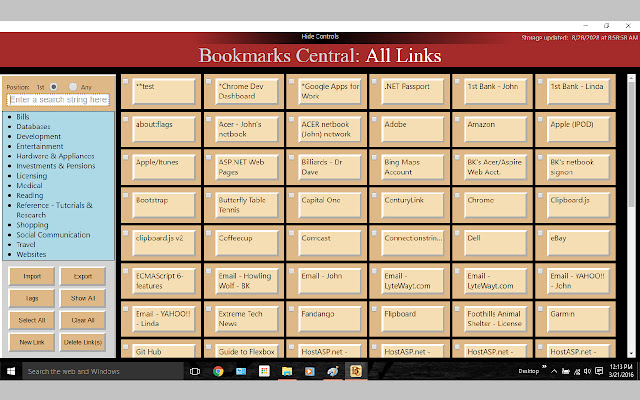


This Chrome app provides a NEW visual interface to web bookmarks. It include a JSON import/export interface in which you can paste/copy JSON for the purpose of loading/backing-up your data. The app is initially installed with sample data to get you started. Loading/unloading your bookmarks is described in the import/export Help (inside the app).
The entire app is protected by a master key that you must provide during the first run (i.e.; installation). Subsequent runs will request your key be entered in the search field - before you will be allowed to enter the app. After that, as with any Chrome app, the app will be available on the taskbar until it is closed.
Links are presented on the main screen as buttons which are labeled based on the arbitrary link name you have assigned during link creation. When you hover over a button, The entire link name is presented in the info popup.
This app is very handy for getting your UID & PW quickly for ANY of your websites! When you leave this app running (on the taskbar) you can activate it, then click on a bookmark/link in the main display, copy the PW or UID from the link detail, click the GO TO button and paste into the site's login screen.
Clicking on a main display button will bring up the detail for that link where you can edit and save your link info - you add and delete links from the main display control buttons. Multiple links can be selected for delete purposes.
Links are sorted by link name. Links can be filtered based on the Search text field which is always present. When specifying a search criteria you may also specify: a) Start looking at the first character of the link name - this is the default, or b) Find a match anywhere within the link name.
Detail consists of: Link Name, Link Address (URL), User ID, Password and Note. A button is provided in the Detail popup which will transfer you to that website.
A tag feature, similar to tags in email (Gmail in particular), is provided. When you create (or edit) a bookmark you can specify one or more tags (categories) from your previously defined tags. When you click on a tag on the main display, only those links with that tag will appear. This is very handy when you have many links.
You can 'show all' simply by pressing enter when the search field is empty and the cursor is in the search field. In many cases, the cursor is left in the search field for this purpose.
Extore is a team of professionals who are passionate about creating extensions for web browsers. This devotion also gives us opportunity to appreciate work of other people. We get inspired by useful, open source extensions made by developers all over the world. Our strong belief is that one should share helpful add-ons with others. That’s why we’d like to present you our ever-growing list of favourite extensions that have inspired us. Moreover, as you probably have already learned, sometimes struggling for the best brings an end to the good. Talking about add-ons it often turns out that an upgrade is worse then previous version. Also it can become really tricky to get back to the beloved version of your favourite extension. That’s why we’re going to make not only the latest, but all versions of our favourite (and we hope yours too) add-ons available for download. No more compromises, just stick to the version you really like!
 Preparing download link, please wait for seconds
Almost done...
Click to download
Error getting file. Please try again
Preparing download link, please wait for seconds
Almost done...
Click to download
Error getting file. Please try again







