

version 1.0.19 - Download ZIP file
version 1.0.17 - Download ZIP file
version 1.0.16 - Download ZIP file
version 1.0.15 - Download ZIP file
version 1.0.13 - Download ZIP file
version 1.0.11 - Download ZIP file
version 1.0.10 - Download ZIP file
version 1.0.9 - Download ZIP file
version 1.0.8 - Download ZIP file
version 1.0.7 - Download ZIP file
version 1.0.4 - Download ZIP file
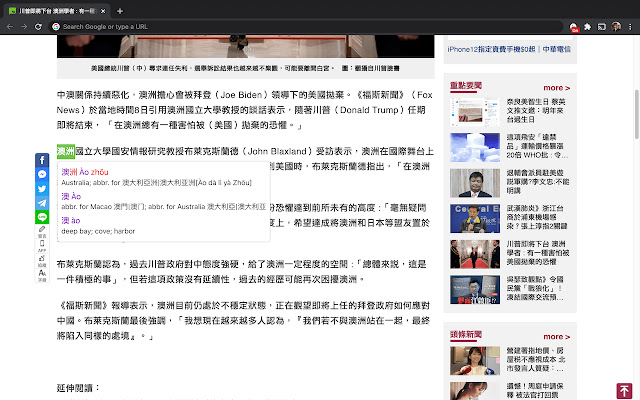
Best Chinese-English and Korean-English pop-up dictionary. Now makes Netflix subtitles accessible to language learners.
All Languages
- Hover to look up words in Korean and Mandarin Chinese - Simplified and Traditional
- Save your words to bookmarks to track what you know. Press 's' or 'b' to save while hovering
- Export your bookmarks for practice in flashcard apps like Anki
- Select a sentence to break it apart into its individual words
- Play words and sentences back with text to speech
- Watch learning subs on Netflix that show both your target and native language
- Turn on and off the Inkah's pop-up dictionary and adjust settings via the icon on the browser. ctrl+i and cmd+i also work as hot keys
- Adjust target language font size for better readability
- Dark mode for easier reading at night
- Supports Google Docs (let us know what else you need support for!)
- Fast and simple
Netflix
- Netflix subtitles become hoverable and accessible to pop-up dictionaries
- Show your target language, transliteration, and native language subtitles all at the same time
- Turn on or off by clicking the Inkah icon sitting at the bottom of the Netflix player
- Auto-pause while hovering over a word
- Use the left and right arrow keys to jump between the previous and next subtitle
- Right panel: See the full list of subtitles for a given episode or movie in the right panel. Jump to a specific subtitle line. Hover to see the native language translation
- Right panel: View the list of words in a subtitle line by clicking the book icon
Korean
- View verb conjugations
- View Hangul Romanization. Off by default by r/Korean request
- Multitude of dictionary and definition ordering improvements over other Korean-English dictionaries like Toktogi
Mandarin Chinese - Simplified (简体) and Traditional (繁體)
- View words with Pinyin, Zhuyin / Bopomofo, and Pleco color-coded tones
- Supports both Simplified Chinese (简体中文) and Traditional Chinese (繁體中文) characters
- Change definition displays to show Simplified, Traditional, or both
- Multitude of dictionary and definition ordering improvements over other Chinese dictionaries like Zhongwen and Pera Pera. Shows full definitions for character variants
Text to Speech
- While hovering: Press 'r' to play back the word
- Dictionary view: Play the same audio repeatedly to hear normal speed, then 75% speed, then 50% speed, and then normal speed again
Settings
- Dictionary: Change whether, after a selection, you see the Inkah icon you can then click on to show the dictionary or the dictionary immediately
- Dictionary: Adjust whether a key needs to be held while hovering to show definitions
- Dictionary: Adjust how long you must hover to show definitions
Caveats
- Extension will not work on Chrome Web Store pages
- Google Docs: Hovering will display the word but not highlight. Later we will support selecting a word or sentence to get the full list of words and definitions
- If a tab was already open during installation, you may need to refresh the page to activate the extension for the page
Discord & Feedback
We love hearing how we may improve :) Join our Discord at https://discord.gg/wErQb44c7Y to let us know how or send any feedback to [email protected].
Firefox Support
https://addons.mozilla.org/en-US/firefox/addon/inkah/
Privacy
Your privacy is of our utmost concern. We do not track what pages or content was visited. Inkah translates words and sentences. That's it.
Credits
Thanks to r/Korean and Twitter for all the engagement and suggestions on how to improve. Please keep them coming!
Thanks to the CEDict project for their tireless Chinese-English open source work.
Extore is a team of professionals who are passionate about creating extensions for web browsers. This devotion also gives us opportunity to appreciate work of other people. We get inspired by useful, open source extensions made by developers all over the world. Our strong belief is that one should share helpful add-ons with others. That’s why we’d like to present you our ever-growing list of favourite extensions that have inspired us. Moreover, as you probably have already learned, sometimes struggling for the best brings an end to the good. Talking about add-ons it often turns out that an upgrade is worse then previous version. Also it can become really tricky to get back to the beloved version of your favourite extension. That’s why we’re going to make not only the latest, but all versions of our favourite (and we hope yours too) add-ons available for download. No more compromises, just stick to the version you really like!
 Preparing download link, please wait for seconds
Almost done...
Click to download
Error getting file. Please try again
Preparing download link, please wait for seconds
Almost done...
Click to download
Error getting file. Please try again







