


Recurring Emails is a free for casual use, privacy-centric Chrome extension, that allows you to send automatically repeating emails and reminders. No tracking, no ads, no banners and no bloatware. Works with all email providers, including
- Apple iCloud Mail
- Gmail (for Gmail use https://recurring-emails-for-gmail.com)
- Yahoo! Mail
+ many more
• Complete Schedule
Send your emails one time by setting a later date, or many times by setting a fully customizable recurring schedule. Set the time of day, which days to send on or the number of times to send, all for a convenient schedule.
• Privacy? How?
Other extensions require you to give up your email privacy by asking for certain permissions. Consenting to those permissions allows them to read all your emails. That's right, all of them! We don't, and won't. We'd never ask you to consent to such permissions and the only sensitive permission required is “Sending email on your behalf via SMTP”.
• Is it free?
Recurring Emails is free for personal, casual use. Check out the paid PRO plans if you represent a company or you simply need to get more out of it.
• Convenience
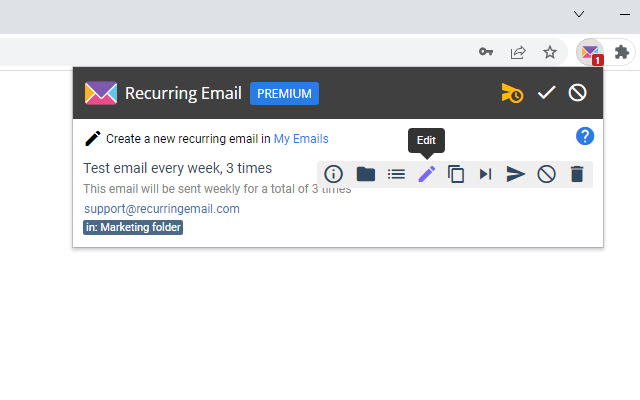
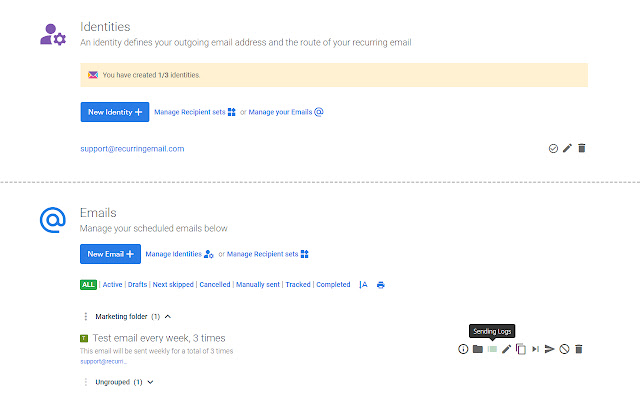
Create your email directly from the provider web interface (Yahoo Mail only) by using the extension's Send Later button or from the My Emails page in a simple, secure way. Edit your emails from the central WebUI interface or from the extension popup
• Templates
Use email templates to quickly draft new emails. Clone any of your existing emails in any state to create new emails from them. Any existing email fills the role of a template.
• Receipts
Receive notifications directly in your inbox after an email has been sent giving you more control over your emails
• Tracking
Email tracking notifies you when a sent email has been opened by one of your recipients. You can view those events by clicking the Logs icon in My Emails.
• Skip
Skip the next sending of your email simply by clicking a button. Your email's schedule then continues normally but the actual sending will be skipped.
• Manual sending
Instantly send an already saved email without changing its schedule. Notifications at your fingertips!
• Folders
Organize your email library in folders, allowing you to manage your emails more effectively. Create archives, trash, recipients folders, or any other folder type that helps you better organize your repeating emails.
Extore is a team of professionals who are passionate about creating extensions for web browsers. This devotion also gives us opportunity to appreciate work of other people. We get inspired by useful, open source extensions made by developers all over the world. Our strong belief is that one should share helpful add-ons with others. That’s why we’d like to present you our ever-growing list of favourite extensions that have inspired us. Moreover, as you probably have already learned, sometimes struggling for the best brings an end to the good. Talking about add-ons it often turns out that an upgrade is worse then previous version. Also it can become really tricky to get back to the beloved version of your favourite extension. That’s why we’re going to make not only the latest, but all versions of our favourite (and we hope yours too) add-ons available for download. No more compromises, just stick to the version you really like!
 Preparing download link, please wait for seconds
Almost done...
Click to download
Error getting file. Please try again
Preparing download link, please wait for seconds
Almost done...
Click to download
Error getting file. Please try again







