
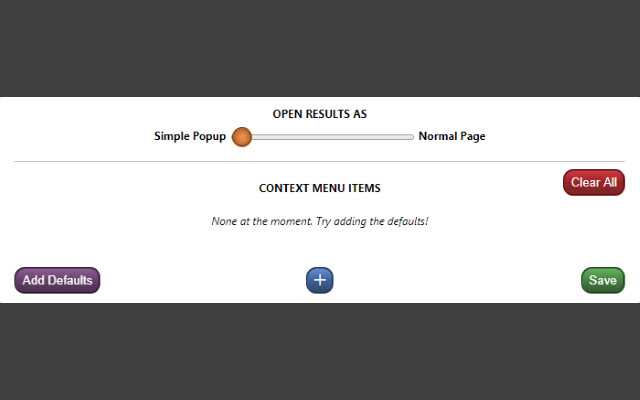


Quickly search information as you browse. Just select the text you want to look up, bring up the right-click context menu, and select the configured lookup option that you want.
Need to quickly check the definition of "bi-weekly" when someone emails you about a meeting? Curious about the literal meaning of "je ne sais quoi" when it comes up in an article? Want to know who exactly "Robert Walpole" is when someone mentions them in a comment?
Context Lookups has you covered! Get up to speed or satisfy your curiosity in no time at all, then be on your merry way. You can set the results to appear as regular webpages, or make things extra convenient with simplified popup windows.
This much can already be done with just the default lookups, but the possibilities go far beyond that. Copy the search query URL base of whatever website you want to use, and create a context menu item for it in the extension popup, it's that simple. Just remember to save your changes!
Here are a couple more to try:
Synonyms/Antonyms
- Use "https://www.thesaurus.com/browse/" as the URL base.
Rhymes
- Use "https://www.rhymezone.com/r/rhyme.cgi?typeofrhyme=perfect&Word=" as the URL base.
Note that ampersand characters (&) in context menu labels are used to assign shortcut keys. To make a letter within the label the shortcut key for the option (while it's shown), simply put an ampersand in front of it. For example, set the label as "Rh&ymes" to make a context menu option "Rhymes" with the shortcut key 'y'. To put an ampersand in the actual label, simply include it twice, as in "Synonyms && Antonyms" to get a label of "Synonyms & Antonyms".
This is my first extension, so any feedback is appreciated.
NOTE: Due to limitations with Chrome, results displayed in a popup are unfortunately restricted to the primary display. If using multiple displays, try to keep the browser window using the extension on the primary display. Otherwise, you can set the results to display as normal pages instead.
Extore is a team of professionals who are passionate about creating extensions for web browsers. This devotion also gives us opportunity to appreciate work of other people. We get inspired by useful, open source extensions made by developers all over the world. Our strong belief is that one should share helpful add-ons with others. That’s why we’d like to present you our ever-growing list of favourite extensions that have inspired us. Moreover, as you probably have already learned, sometimes struggling for the best brings an end to the good. Talking about add-ons it often turns out that an upgrade is worse then previous version. Also it can become really tricky to get back to the beloved version of your favourite extension. That’s why we’re going to make not only the latest, but all versions of our favourite (and we hope yours too) add-ons available for download. No more compromises, just stick to the version you really like!
 Preparing download link, please wait for seconds
Almost done...
Click to download
Error getting file. Please try again
Preparing download link, please wait for seconds
Almost done...
Click to download
Error getting file. Please try again







