

version 0.0.4055 - Download ZIP file
version 0.0.4053 - Download ZIP file
version 0.0.4052 - Download ZIP file
version 0.0.4050 - Download ZIP file
version 0.0.404 - Download ZIP file
vulog is an extension app that allows you to (1) bookmark web pages pages, highlight text on those pages, and take notes, (2) save your browsing history, and (3) see the cookies tracking you on various web sites, and delete them.
Interacting with vulog
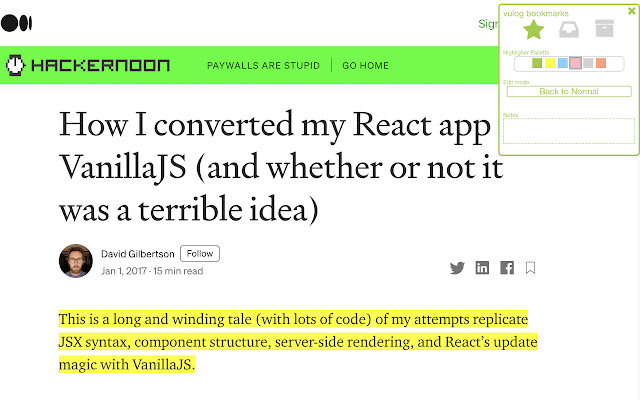
- The pop-up - Press the vulog button at the top of your browser and the vulog pop-up appears. So you can bookmark the page you are on, take notes and view your inbox. You can also click on a link to view your bookmarks in a browser tab, and choose your highlighting color and edit mode.
- Browser tab: View and search your bookmarks, or filter to see what you have bookmarked. (Use link under the inbox tab.)
- The webpage-box: Press CNTRL S (Mac: CMD S) on any web page and you will see a small box on the top right of the page where you can bookmark and take notes, and also change your highlighting options and edit mode. (see below) Press escape to close the web-page box.
- Right-Click: When you highlight text, you can right click on it to highlight the text. If you right click on a web page link, you also have a choice to add it to your inbox for later reading.
- 'Edit Mode': If you turn on edit mode (from the pop-up or webpage-box), then your cursor will turn into a giant highlighter and you can highlight text. When you press on a link in edit mode, you get the option of adding it to you inbox (which means you dont have to go through the right-click menu)
Highlighting text: You can highlight parts of any web page in different colors. Use the highlight pallette in the pop-up or webpage-box to choose your highlight color. For easier highlighting, turn on edit mode.
Bookmarking: You can add any page to your favorites, inbox or archive using the pop-up or webpage-box. The 'inbox' tab in your pop-up automatically shows all the items marked with inbox, and not marked with archive. From there you can also see all your bookmarks in a browser tab. Also, while the menu is open, pressing cntrl/cmd-I adds to inbox, cntrl/cmd-A archives, and pressing cntrl/cmd-S again adds it to favorites.
Web Page Info: The pop-up shows detailed info on the web pages you visit. You can see the cookies and third party trackers that a site is using, and you can delete all the trackers that vulog has found. (Web pages have many ways of tracking you, so dont think this is a magic bullet.)
Data storage: Your bookmarks and browser history is kept in the chrome's local storage, which has limited space. After some weeks (or months depending on usage), vulog automatically deletes older items.
Privacy and CEPS
vulog doesn't send any of your data to any outside servers, and you can always delete your data from the "More" tab. If you want to store your data on your own server you will need to set up a Personal Data Store. vulog was built to be able to accept CEPS-compatible data stores. (See here for more details https://www.salmanff.com/ppage/2020-3-15-Why-CEPS-Matters )
Having your data sit on your personal data store also means that you can publish your bookmarks and highlights and notes. Press the bullhorn button to publish the link from your server.
Acknowledgements
Highlighting functionality was largely copied from Jérôme Parent-Lévesque. https://github.com/jeromepl/highlighter Rendering function (dgelements.js) was inspired by David Gilbertson (who never expected someone to actually implement his idea I think.) https://medium.com/hackernoon/how-i-converted-my-react-app-to-vanillajs-and-whether-or-not-it-was-a-terrible-idea-4b14b1b2faff
Extore is a team of professionals who are passionate about creating extensions for web browsers. This devotion also gives us opportunity to appreciate work of other people. We get inspired by useful, open source extensions made by developers all over the world. Our strong belief is that one should share helpful add-ons with others. That’s why we’d like to present you our ever-growing list of favourite extensions that have inspired us. Moreover, as you probably have already learned, sometimes struggling for the best brings an end to the good. Talking about add-ons it often turns out that an upgrade is worse then previous version. Also it can become really tricky to get back to the beloved version of your favourite extension. That’s why we’re going to make not only the latest, but all versions of our favourite (and we hope yours too) add-ons available for download. No more compromises, just stick to the version you really like!
 Preparing download link, please wait for seconds
Almost done...
Click to download
Error getting file. Please try again
Preparing download link, please wait for seconds
Almost done...
Click to download
Error getting file. Please try again







