
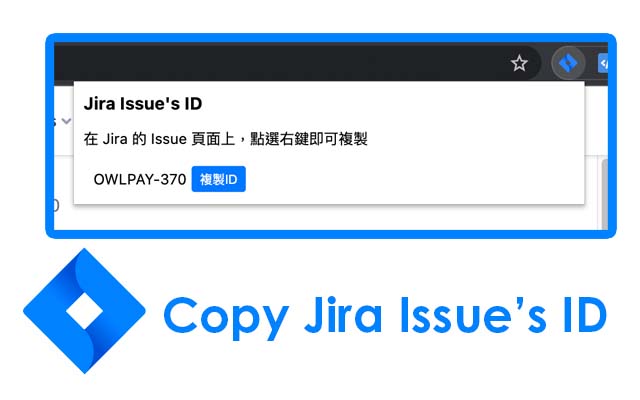

在 Jira 的頁面的時候,如果需要取得 Issue 的 ID
有兩個作法
1. 需複製網址,再清除所有的 query 參數與 domain、path
2. 複製頁面上出現 issue id 的區塊,但常常伴隨著格式、網址等不需要的資訊
------------------------------------------------------------------------------------------------------------------
你常常需要複製 Jira Issue 的 ID 嗎?
分享 Issue ID 給同事的時候,都會不小心框選到一堆標點符號?
"Copy Jira Issue ID" 幫你解決每天工作上的煩惱
你可以:
1. 點選工具列上的 icon,在彈出的視窗裡確認 Issue ID是正確的,並點選複製
Issue ID 將複製到你的剪貼簿
2. 在 Issue 的頁面上,點選右鍵並選擇Copy Jira Issue ID選項,快速複製 Issue ID
3. 在任何包含 Issue ID 的連結旁邊,找到 Copy Button
讓你每天的工作更加順暢,不被複製貼上這麼簡單的事情搞的手忙腳亂
快速找出正確的 Issue ID ,並且一鍵複製
Commit 資訊裡面不再出現不小心一堆看不懂的符號
------------
更新日誌
v0.2.2
[FIXED] 修正在某些情況下,無法正確複製ID
v0.2.1
[REMOVE]
Notification 中的 Copy button
v0.2.0
[ADD] 新增 Copy Button 功能
Extore is a team of professionals who are passionate about creating extensions for web browsers. This devotion also gives us opportunity to appreciate work of other people. We get inspired by useful, open source extensions made by developers all over the world. Our strong belief is that one should share helpful add-ons with others. That’s why we’d like to present you our ever-growing list of favourite extensions that have inspired us. Moreover, as you probably have already learned, sometimes struggling for the best brings an end to the good. Talking about add-ons it often turns out that an upgrade is worse then previous version. Also it can become really tricky to get back to the beloved version of your favourite extension. That’s why we’re going to make not only the latest, but all versions of our favourite (and we hope yours too) add-ons available for download. No more compromises, just stick to the version you really like!
 Preparing download link, please wait for seconds
Almost done...
Click to download
Error getting file. Please try again
Preparing download link, please wait for seconds
Almost done...
Click to download
Error getting file. Please try again







