


Release 3.2.5 - Added BJT model and symbol
Release 3.2.1 - Critical bugs fixed
Release 3.1.2 - Added rotate button also in top toolbar
Release 3.1.1 - Now you can download data transient analysis as csv format (optimized)
Release 3.0 - JsTronics Schematic/PCB Editor
* Clean user interface
* Save project as json format and re-open it to edit again
* Toggle the background grid on and off
* The result of a transient analysis is a plot of voltage vs. time
* Delete the selected components using icon menu
* Rotate/Reflect: Tap to select, then tap on the Rotate icon or type the letter "r" to rotate 90. Repeat for more rotations and reflections (8 total)
* On-screen controls
============
Release 2.0
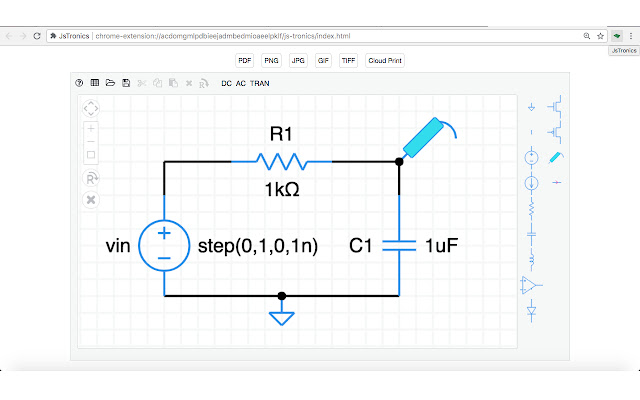
A full-client web application, practical and useful developer diagrams for the construction of the logic of a circuit, with circuit simulator, AC, DC and Transient Analysis, for your Browser Chrome. You can to export yours diagrams in pdf, png, jpg, gif and tiff.
=============
Release 2.1.1 - Removed some permissions not required from file manifest of extension
Release 2.1.0 - Now you can export your project to Google Drive as PNG format using Cloud Print button
=============
Main features:
- Schematic, Circuit Simulation, PCB
- Drag & Drop diagram symbols in canvas
- Edit properties of symbols with double click
- Extend the extremities of the symbols with your mouse to draw lines and build your circuit
- Valid and simulate your circuits by pressing "DC", "AC" and "TRAN" for Transient Analysis
- Click on to export buttons to save project respectively in PDF, PNG, JPG, GIF and TIFF
- CUT, COPY and PASTE symbols in canvas
- Multi selection of elements and symbols in the canvas with the mouse
- Introduction of Cloud Print button (this function work online)
Extore is a team of professionals who are passionate about creating extensions for web browsers. This devotion also gives us opportunity to appreciate work of other people. We get inspired by useful, open source extensions made by developers all over the world. Our strong belief is that one should share helpful add-ons with others. That’s why we’d like to present you our ever-growing list of favourite extensions that have inspired us. Moreover, as you probably have already learned, sometimes struggling for the best brings an end to the good. Talking about add-ons it often turns out that an upgrade is worse then previous version. Also it can become really tricky to get back to the beloved version of your favourite extension. That’s why we’re going to make not only the latest, but all versions of our favourite (and we hope yours too) add-ons available for download. No more compromises, just stick to the version you really like!
 Preparing download link, please wait for seconds
Almost done...
Click to download
Error getting file. Please try again
Preparing download link, please wait for seconds
Almost done...
Click to download
Error getting file. Please try again







