
version 0.2.2 - Download ZIP file
version 0.2.1 - Download ZIP file
version 0.1.0 - Download ZIP file
I am no longer actively maintaining this extension until further notice, because I have switched back to Firefox.
Feel free to fork it and do whatever the license permits.
Or use another similar extension:
https://chrome.google.com/webstore/detail/save-in%E2%80%A6/jpblofcpgfjikaapfedldfeilmpgkedf?hl=en-US
(that is also available for Firefox).
###############
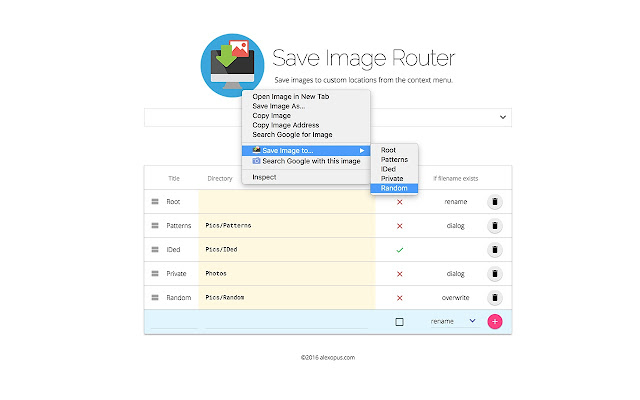
Save images (and videos) to custom folders from the right-click context menu.
Chrome allows saving files only within the configured downloads location. All the configured directories will go under the downloads location of Chrome. E.g. directory `Nature` will become `/Users/name/Downloads/Nature` when `/Users/name/Downloads` is the configured download location in Chrome.
If the browser keeps opening the save dialog, make sure to uncheck "Ask where to save each file before downloading" in Chrome settings.
Use slash (`/`) or backslash (`\`) for sub-directories. Empty directory will go to the Chrome download location directly.
Directory names may not contain these characters: ? : ~ " < > * |
The extension may not work properly if other download managing extensions are installed (which use chrome.downloads.onDeterminingFilename API)!
Leave your feedback and suggestions!
This extension is open source:
https://github.com/alexopus/SaveImageRouter
If possible, post problems that you encounter to the issues page on github:
https://github.com/alexopus/SaveImageRouter/issues
Updates:
Version 0.2.0 (2016-07-15): Allow to use backslashes to divide sub-directories. These are internally converted to slashes.
Version 0.2.3 (2016-10-17): Provide file renaming prefixes, suffixes with host, time stamps.
Version 0.2.4 (2017-04-07): Open the source code: https://github.com/alexopus/SaveImageRouter
Version 0.2.5 (2017-04-08): Add github link to the options page.
Version 0.2.6 (2017-05-21): Enable renaming using full URL path.
Version 0.2.7 (2017-05-21): Fix occasional need for browser reload.
Version 0.2.8 (2017-06-11): Provide default download path in the menu.
Version 0.2.9 (2017-06-30): Allow turning off the default path display.
Version 0.2.10 (2017-09-07): Also allow saving videos.
Version 0.2.11 (2017-09-07): Bugfix.
Version 0.2.12 (2017-10-08): Allow renaming for more exotic hosts (filename determined by Chrome).
Extore is a team of professionals who are passionate about creating extensions for web browsers. This devotion also gives us opportunity to appreciate work of other people. We get inspired by useful, open source extensions made by developers all over the world. Our strong belief is that one should share helpful add-ons with others. That’s why we’d like to present you our ever-growing list of favourite extensions that have inspired us. Moreover, as you probably have already learned, sometimes struggling for the best brings an end to the good. Talking about add-ons it often turns out that an upgrade is worse then previous version. Also it can become really tricky to get back to the beloved version of your favourite extension. That’s why we’re going to make not only the latest, but all versions of our favourite (and we hope yours too) add-ons available for download. No more compromises, just stick to the version you really like!
 Preparing download link, please wait for seconds
Almost done...
Click to download
Error getting file. Please try again
Preparing download link, please wait for seconds
Almost done...
Click to download
Error getting file. Please try again







